

Have you ever visited a website and been surprised it already knows your city, showing you local news or weather? Or maybe you’ve hit that frustrating wall: “This content is not available in your country.” Both of these things happen because the internet knows your approximate location, thanks to your device’s unique digital address. Find the best proxies for google ads.
Every computer, phone, or tablet connected to the internet is assigned an IP address, which works a lot like the return address on an envelope. When your browser requests a webpage, your IP address tells the website’s server exactly where to send the information back. Without it, the data you asked for—from articles to videos—would have no way to find you.
But this digital address does more than just complete your requests; it reveals your general physical location. You can see this for yourself by typing “what is my IP address” into a search engine. Because this address is public, websites can use it to either customize content for you or restrict it entirely, making it the first step toward controlling your online privacy and access.
How a Web Proxy Works: Your Personal Internet Chaperone
Imagine you want to order something online but don’t want the store to know your home address. Instead, you could send a personal assistant who receives the package and then brings it to you. A web proxy acts as your digital assistant for the internet, handling requests on your behalf to add a layer of privacy and control.
The entire interaction is a simple, four-step relay that happens in the blink of an eye:
- You send your request (e.g., “show me this website”) to the proxy server first.
- The proxy then sends that request to the website, but using its own IP address.
- The website sees the request from the proxy and sends the information back to it.
- Finally, the proxy forwards that information directly to you.
The website you visit never sees your computer’s real IP address. From its perspective, the entire visit came from the proxy server. This is the core of IP address masking—your digital “return address” is effectively swapped out and hidden from view.
Because the website thinks you are browsing from the proxy’s location, this simple swap is more than just a privacy trick. It’s the key that can unlock websites and content that might otherwise be out of reach.
Unlock a World of Content: How to Access Geo-Restricted Websites
Have you ever found the perfect show to stream, only to hit a wall: “This content is not available in your region”? This frustrating message is the result of geo-blocking. Websites check your IP address to see what country you’re in and then limit what you can see based on that location. Companies often do this because of licensing deals for movies or to show different prices in online stores, creating digital borders that can keep you from the content you want.
Because a proxy server swaps your IP address for its own, it holds the key to hopping over these digital borders. The strategy is surprisingly simple: connect through a proxy server located in the country where that content is available. For example, if you want to watch a British TV series from the United States, you would use a proxy based in London. The streaming service sees the British IP address and grants you access.
This digital passport works for more than just entertainment. You can explore international versions of news sites that might offer different perspectives or browse online stores to find region-exclusive products. Many of the best proxy sites provide a list of countries to choose from, giving you the power to appear almost anywhere. The same core idea is also incredibly useful for bypassing local restrictions, like those you might find at school or work.
The Simple Trick to Unblock Websites at School or Work
It’s not just big digital borders that can block your way online. School and office networks often have their own set of rules, enforced by a digital gatekeeper called a firewall. Think of this firewall as a bouncer with a strict list of approved websites. If you try to visit a site that isn’t on the list—like social media or a gaming site—the firewall simply denies your request. This is why you can browse an encyclopedia but can’t check your Instagram feed on the school’s Wi-Fi.
A proxy gives you a clever way to slip past this bouncer. When you connect to the proxy, the network’s firewall only sees you visiting one uninteresting, permitted website (the proxy itself). It has no idea that the proxy is then fetching the blocked content on your behalf. Your final destination remains hidden from the local network.
For this specific task, the easiest tool is often a free web proxy. These are simple websites where you just type in the address of the site you want to visit. Services like a proxypy web proxy act as a browser-within-a-browser to get you where you want to go. While convenient, this raises an important question: if the service is free, what’s the catch? The proxy can see everything you’re doing, and not all providers can be trusted.
The Hidden Dangers of “Free” Web Proxies: Are They Really Safe?
Running a proxy server costs money for electricity, maintenance, and a fast internet connection. If the service is offered for free, the provider has to make money somehow. In many cases, you aren’t the customer; you are the product. Free online proxies are almost always unsafe, especially for anything private.
The most common risk is data logging. The free proxy service can keep a detailed log of every single website you visit. This browsing history is valuable information that can be sold to data brokers or advertising companies. The very tool you’re using for privacy could be actively violating it.
An even greater danger is malware injection. Because the proxy is the middleman, it can intercept the websites you requested and inject its own code before sending them to you. It might add extra pop-up ads, redirect you to scam websites, or even try to install harmful software on your device.
These risks lead to one critical security rule: Never enter any passwords, credit card numbers, or sensitive personal information while using a free web proxy. Since the proxy can see and record everything you type, you’re handing your most important data directly to an unknown operator. For simple, anonymous browsing they might seem fine, but for anything else, the risk is too high.
Proxy vs. VPN: Which Digital Disguise Do You Actually Need?
Given the risks of free proxies, a safer alternative is a VPN, or Virtual Private Network. While both tools can hide your real IP address, the difference in how they protect you is enormous. Think of a proxy as changing the license plate on your car for a single trip, whereas a VPN puts your car inside a sealed, unmarked truck for the entire journey.
A major distinction lies in what each tool covers. A proxy server usually only works for one specific program at a time, like your web browser. Other apps on your device—like an email client, a software update, or an online game—are still using your normal internet connection, completely exposed. It’s a solution targeted for one task, not for overall privacy.
The most critical upgrade a VPN offers is encryption. A VPN doesn’t just reroute your request; it scrambles all of the data traveling between your device and the VPN server, creating a private, secure tunnel. If anyone were to snoop on your connection, such as a hacker at a coffee shop or your internet service provider, all they would see is unreadable gibberish. Most proxies simply don’t offer this powerful security feature.
For quick, low-stakes tasks like watching a video that’s blocked in your region, a reputable proxy might get the job done. However, for any activity that involves your privacy or security—like using public Wi-Fi or logging into sensitive accounts—a VPN is the far superior and safer choice, providing comprehensive protection for your entire digital life.
Finding the Right Tool: A Simple Guide to Proxy Types
Not all proxies are created equal, especially when it comes to privacy. Some are designed for entirely different jobs and won’t hide you at all. Knowing the difference is key to picking the right tool.
First up is the transparent proxy. You’ve likely used one without even knowing it. These are often set up by schools, libraries, or companies to filter content, block certain websites, or improve speed. A transparent proxy doesn’t hide your IP address or provide any anonymity; its job is to monitor traffic, not disguise it. For this reason, it’s useless for personal privacy.
Next is the anonymous proxy. This is the first step into actual privacy. It successfully hides your real IP address from the websites you visit, which is great for bypassing simple geographic restrictions. The catch? It still tells the website, “Hey, I’m a proxy server!” Some websites or services may block traffic from known proxies, so this isn’t a foolproof solution.
For those seeking the highest level of privacy, the gold standard is the high-anonymity proxy (also called an “elite” proxy). This type of proxy hides your real IP address and doesn’t identify itself as a proxy. To the destination website, your visit looks like it’s coming from a regular user. When your goal is to maximize privacy and avoid being blocked, this is the type you should always look for.
HTTP vs. SOCKS5: One for Browsing, One for Everything Else
After choosing a high-anonymity proxy, you might notice another choice: HTTP vs. SOCKS5. Think of this as choosing between a specialist and a multi-talented assistant. Both can act as your middleman, but they are built for different kinds of tasks.
An HTTP proxy is the specialist, designed to handle web traffic. When you use your browser to visit websites, you’re using a protocol called HTTP (or its secure version, HTTPS). An HTTP proxy understands this web language perfectly, making it a straightforward choice for browsing websites anonymously. Its limitation, however, is that it only works for web browsing.
The SOCKS5 proxy is the flexible all-rounder. Unlike an HTTP proxy, a SOCKS5 proxy doesn’t need to understand the data it’s handling; it just passes it along. This raw versatility makes it the superior choice for almost any activity outside of a web browser, such as an online game, a streaming app, or a messaging program. The rule is simple: for websites, HTTP is fine. For anything else, SOCKS5 is the way to go.
How to Actually Use a Proxy: 2 Simple Methods
Putting a proxy to work is easier than you might think. The quickest way is by using a free web proxy site. These are websites that have a single search bar on their homepage. Instead of typing a web address into your own browser, you type it into theirs. The site then fetches the content for you and displays it within its own page. This method is great for a one-time need, like accessing a single blocked article, but these sites are often slow, filled with ads, and not ideal for regular use.
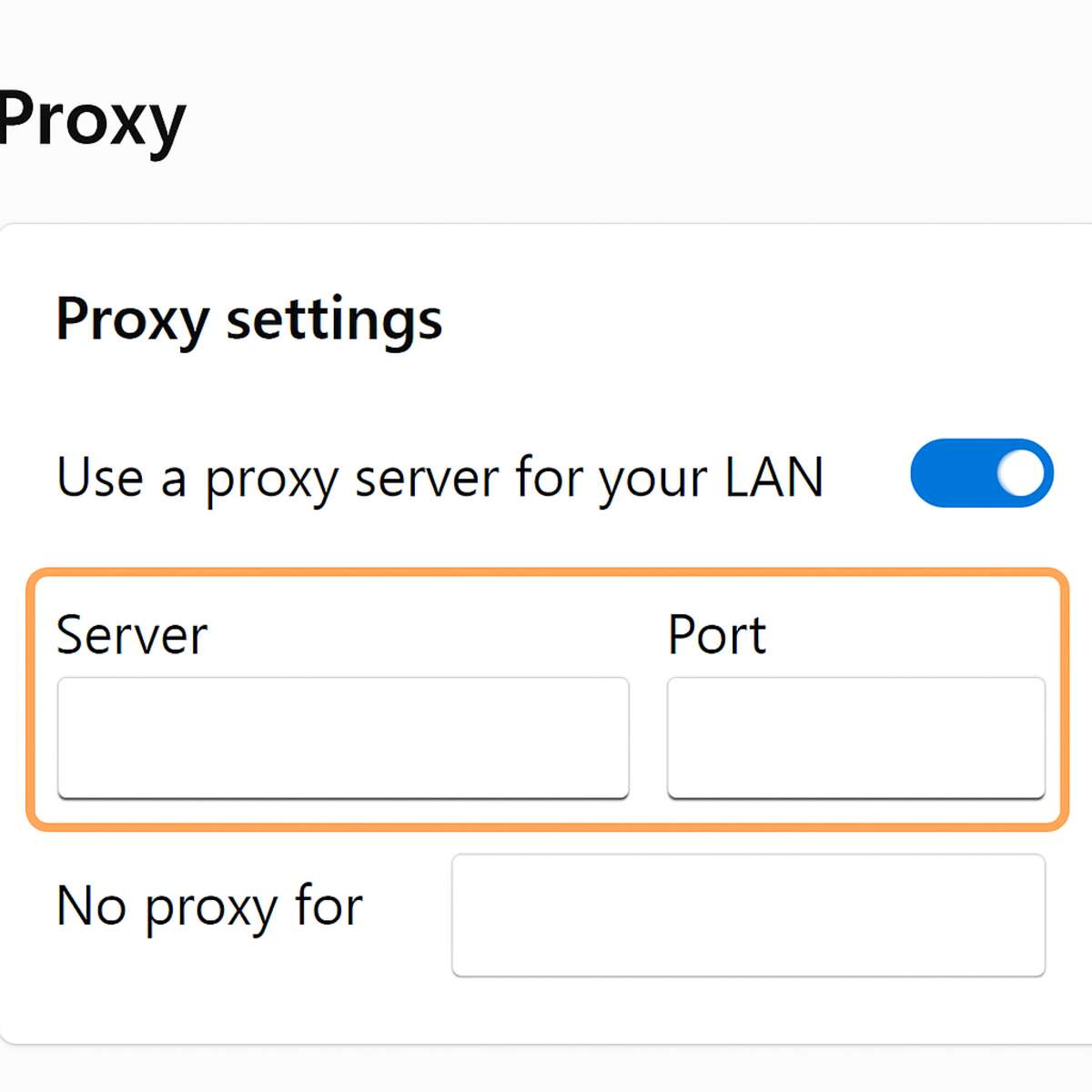
For a more stable experience, you can configure a proxy directly in your browser. You’ll need the server address and a port number from your proxy provider. Think of the server address as the proxy’s street address and the port number as a specific apartment number. It tells your computer exactly which “door” to use to connect, ensuring your requests go to the right place.
You can make this change in your browser’s “Settings,” under the “Network” or “Connection” section where you can configure browser proxy settings. There, you will see fields to enter the server address and port number. Once saved, all your browsing traffic will go through the proxy.
Choosing between these methods comes down to your needs. A web proxy is like asking a stranger to look something up for you—quick but temporary. Configuring your browser is like setting up your own private forwarding service, offering a much smoother and more reliable connection for daily use.
Residential vs. Datacenter Proxies: Why a ‘Real’ Address Is Better
The next question is what kind of proxy address to use. Think of it like this: some return addresses are clearly commercial, while others look just like a regular home address. This is the core difference between a datacenter proxy and a residential proxy. A datacenter proxy’s IP address comes from a massive, corporate server farm. In contrast, a residential proxy uses an IP address assigned by an Internet Service Provider (like Comcast or Verizon) to a real home, making it appear as a genuine, everyday user.
This distinction is crucial because websites have become very good at spotting and blocking traffic from datacenter proxies. Since these addresses all come from a handful of large tech companies, it’s easy for a service like Netflix to create a blocklist. On the other hand, a residential proxy’s traffic is indistinguishable from that of any other person browsing from their living room. Blocking it would mean blocking thousands of potential legitimate customers, something websites are reluctant to do.
For basic tasks where you’re unlikely to be blocked, a cheaper datacenter proxy might be enough. For more sensitive use cases—like accessing a region-locked streaming library or managing an online business profile—a residential proxy is far more reliable because it avoids detection. This higher level of trust is why they typically come at a premium cost, but they are often worth the investment.
What Is a Reverse Proxy? The Invisible Butler of the Internet
So far, we’ve explored proxies as a tool you can use to protect your identity. But there’s another kind that works from the opposite direction, used by the websites themselves: a reverse proxy. A regular (or “forward”) proxy is like a personal shopper you hire. A reverse proxy, on the other hand, is like the store’s security guard and front-desk receptionist, hired by the store to manage everyone who comes in.
A reverse proxy acts as a website’s invisible butler, improving security and speed. It inspects incoming traffic to filter out threats and can also direct requests across multiple servers, like a traffic cop preventing a jam. This is why huge websites like Amazon or Netflix can handle millions of users at once without crashing—their reverse proxies are working tirelessly behind the scenes.
The difference is simple: a forward proxy hides your identity from the website, while a reverse proxy hides the website’s complex internal servers from you. For your own privacy and access needs, the tool you’re looking for is a forward proxy.
Your Web Proxy Action Plan: What to Use and When to Use It
The internet is no longer a fixed map. Where you once saw digital roadblocks or felt tracked by your location, you now have a detour available. By sending a web proxy to act on your behalf, you gain control over how and from where you connect to the web.
Here’s how to choose the right tool for the job:
- If you want to… quickly unblock one website at school or work, Then try… a reputable free web-based proxy.
- If you want to… regularly watch geo-blocked streaming content, Then consider… a paid proxy service you can configure in your browser.
- If you want to… keep all your data private and stay secure on public Wi-Fi, then use… a trusted VPN instead of a proxy.
Your most important new skill is knowing when to be cautious. Your proxy can see your traffic, so never enter passwords or personal details on a free service. You’ve traded a direct connection for more freedom, and now you have the knowledge to choose your route wisely, ensuring every online journey is both open and secure.
